
Securing Azure Functions: Connecting Storage Accounts with Managed Identities

TL;DR: The Key Takeaways at a Glance
The Problem: By default, Azure Functions use connection strings for storage accounts, granting full access if leaked.
The Half-Measure: Azure Key Vault hides the string but doesn’t fix the lack of granular permissions (full access remains full access).
The Best Practice: Use Managed Identities combined with Role-Based Access Control (RBAC).
The Implementation: Replace
AzureWebJobsStoragewithAzureWebJobsStorage__accountNameand assign the “Storage Blob Data Contributor” role.The Security Lever: Completely disable “Storage account key access” in your storage settings.
Cloud platforms like Azure are meant to have our backs so we can focus on building applications. But this convenience often hides a trap: by default, a newly created Azure Function stores its connection to the Storage Account (the AzureWebJobsStorage) as a plain-text connection string in the environment variables.
Most developers recognize this risk and instinctively reach for Azure Key Vault to hide the secret. While that is better than plain text, it fails to solve the root problem. In this article, drawing from a real client project, I will show you why Key Vault falls short for this specific connection and how you can permanently secure your Azure Functions using Managed Identities and true authorization concepts.
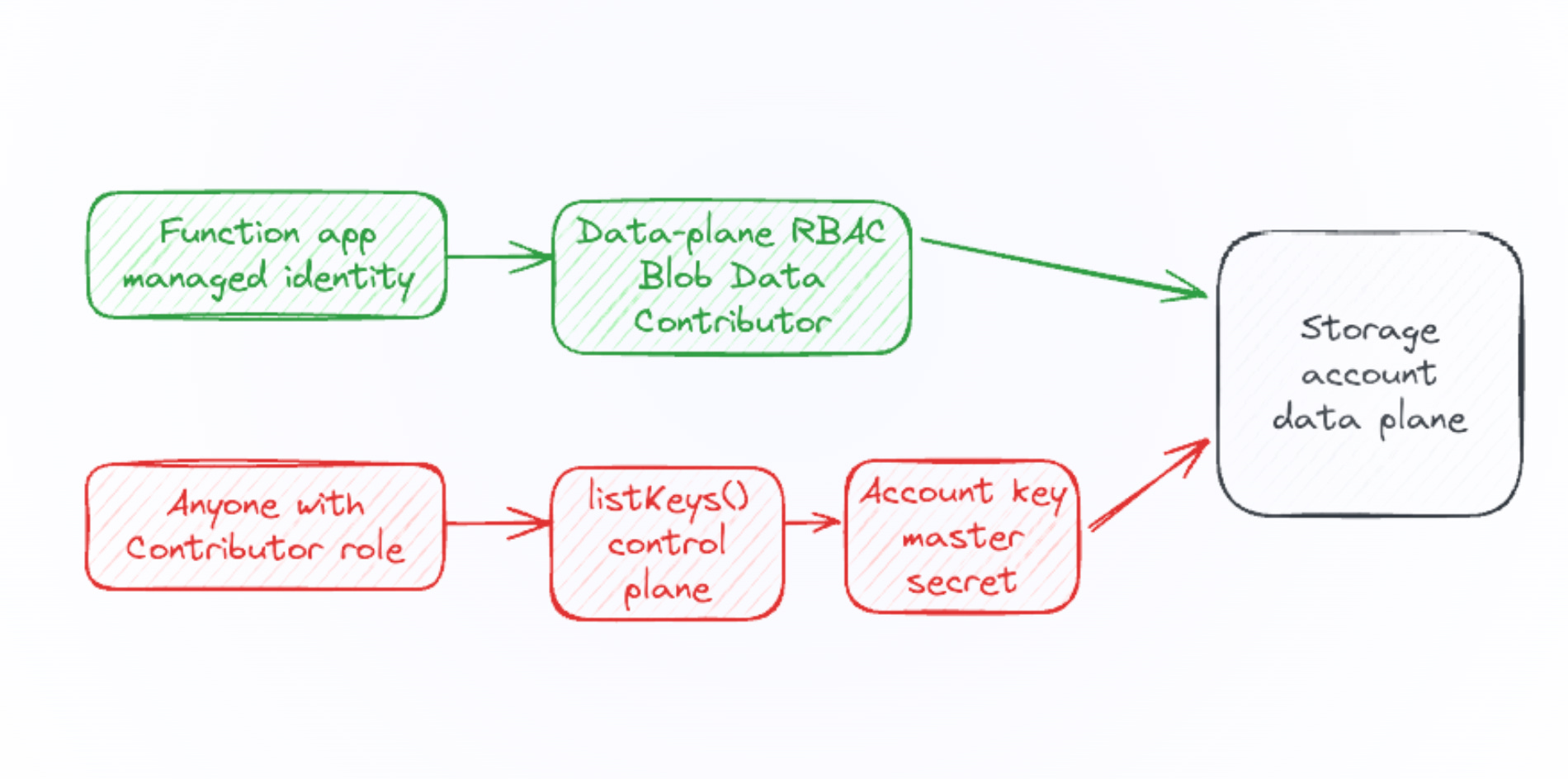
Why Key Vault References Fail to Secure Storage Connections
The classic approach to security usually looks like this: we create a Key Vault, store the connection string as a secret, and configure the Function App with a reference (@Microsoft.KeyVault(...)). To grant the Function access, we enable a “System Assigned Managed Identity” and assign it the “Key Vault Secrets User” role.
This successfully hides the secret from prying eyes in the source code. But the fundamental architectural flaw remains. A connection string has no concept of granular permissions. Whoever holds the key acts as an absolute admin. We have no way to enforce rules like, “This function may only create new files, but never delete existing ones.” Therefore, to build truly secure cloud architectures, we must completely eliminate the connection string acting as a master password.
How to Connect Azure Functions Using Managed Identities
To implement a Managed Identity without any secrets, follow these steps in your Azure Portal:
Remove the Connection String: Delete the
AzureWebJobsStorageenvironment variable in your Function App completely.Set the Account Name: Add a new app setting named
AzureWebJobsStorage__accountNameand enter just the name of your Storage Account.Define the Credential Type: Add another app setting named
AzureWebJobsStorage__credentialand set its value tomanagedidentity.Assign an RBAC Role: Navigate to “Access Control (IAM)” in your Storage Account. Assign the Function App’s Managed Identity a specific role (e.g., “Storage Blob Data Contributor”).
Disable Access Keys: Go to the “Configuration” settings in your Storage Account and set “Allow storage account key access” to Disabled.
Once the function restarts, it authenticates exclusively via Azure Entra ID. The Storage Account can no longer be breached via traditional keys.
Conclusion & Next Steps
The essence of a secure cloud platform is not just knowing how to deploy applications, but how to make them tamper-proof. Moving from static connection strings to Managed Identities requires an initial shift in how you manage permissions (RBAC). However, in the long run, it closes one of the biggest security gaps in serverless architectures and renders stolen credentials practically useless.
For your next step, audit your existing Azure Functions. Identify all resources still relying on AzureWebJobsStorage strings and migrate them to this identity-based model immediately.
Azure Functions ohne Connection String: Managed Identity richtig verwenden